

Dive deep into our ManyChat Review to discover how this powerful marketing tools and sales automation software can elevate your customer engagement on Facebook, Instagram, WhatsApp, and even your website!
Is Manychat the Right Chatbot Platform for You?
We put Manychat to the test! In this detail ManyChat review, we’ll dissect its features, advantages, and drawbacks. We’ll also explore its pricing structure and ideal use cases for your chat automation needs.
Thinking about automating your customer interactions? Manychat is a popular choice, but is it the best fit for your needs?

This in-depth ManyChat review breaks down everything you need to know:
- Features: We’ll explore Manychat’s powerful tools like the user-friendly flow builder, custom fields, and integrations with Facebook, Instagram, and more.
- Pros & Cons: Discover the Manychat platform’s strengths, like its ease of use and growth tools, alongside potential drawbacks like limited language translation options.
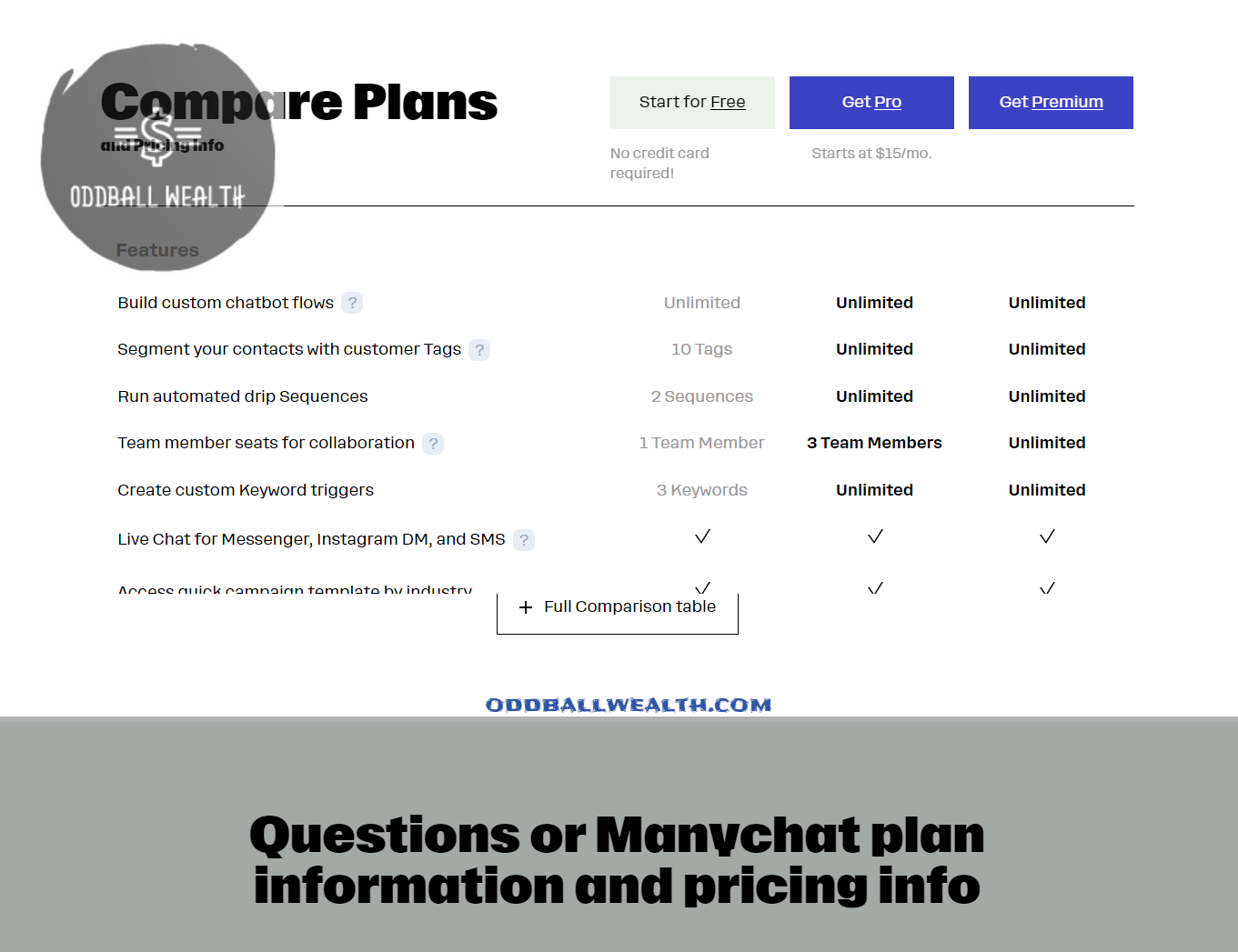
- Pricing: We’ll discuss Manychat’s free and paid plans, starting at $15/month, to help you decide if it fits your budget.
- When to Use Manychat: Find out if Manychat’s capabilities align with your specific chatbot needs.
Ready to dive in? Let’s see if Manychat is the key to unlocking smoother customer interactions!

- Is Manychat the Right Chatbot Platform for You?
- Our Verdict for ManyChat
- ManyChat Pros at a Glance
- ManyChat Cons to Consider
- Manychat's Features
- The Challenge: Multi-Language Support
- How does ManyChat’s pricing model work?
- What are the key differences between ManyChat's free plan and the Pro plan?
- Detailed Look at Manychat's Pros and Cons
- ManyChat Automation Chatbot Pros and Advantages
- ManyChat Cons and Disadvantages
- Who Should Consider Manychat?
- What are the most common use cases for ManyChat automation features?
- How do ManyChat automation features handle customer feedback and complaints?
- What integration options does ManyChat offer for live chat platforms?
- Can I set up multiple integration options for live chat platforms in ManyChat?
- Can I integrate multiple live chat platforms with ManyChat, such as LiveChat and Chatfuel?
- Manychat Alternatives: A Head-to-Head Look
- How to Choose the Best ManyChat Alternative
- Getting Started with Manychat: A Step-by-Step Guide
- ManyChat Tips
- ManyChat User Ratings and Reviews
Our Verdict for ManyChat
Manychat shines as a top choice for crafting chatbots across Facebook, Instagram, WhatsApp, and SMS. Its user-friendly interface and visual flow builder empower anyone to build chatbots without coding. Plus, Manychat offers both free and paid plans, starting at $15/month, making it ideal for chatbot beginners and budget-conscious users.

ManyChat Pros at a Glance
- Effortless Flow Builder
- Unlimited Custom Fields & Tags for Personalization
- Seamless Integration with Major Platforms (Facebook, Instagram, WhatsApp, SMS & Telegram)
- Growth Tools to Drive Users into Your Sales Funnels
- Broadcast, Sequence, and Rule Management
- Built-in Live Chat with Zapier and Make Integrations for Enhanced Functionality
- AI Features: Intents, AI Steps & AI Flow Builder Assistant
ManyChat Cons to Consider
- Multi-Language Chatbot Support Can Be Challenging
Manychat’s Features
Now that we’ve established Manychat’s strengths and target audience, let’s explore its features in more detail:
1. Effortless Flow Builder
Manychat’s drag-and-drop interface makes crafting chatbot conversations a breeze. Even without coding experience, you can design engaging interactions with users by visually connecting elements like text messages, buttons, and media.
2. Unlimited Custom Fields & Tags
Personalize your chatbot interactions by collecting and storing unique user data. With unlimited custom fields and tags, you can tailor responses and experiences based on individual preferences and past interactions.
3. Multi-Platform Integration
Reach your audience where they are! Manychat seamlessly integrates with Facebook Messenger, Instagram Direct Messaging, WhatsApp, SMS, and Telegram. This allows you to manage your chatbot interactions from a single platform, streamlining your communication.
4. Growth Tools to Fuel Your Sales Funnels
Manychat provides powerful tools to nurture leads and convert them into paying customers. Design engaging welcome messages, capture email addresses and phone numbers, and even send targeted broadcasts to promote your products or services.
5. Broadcast, Sequence, and Rule Management
Stay connected with your audience through targeted messaging. Schedule and send mass broadcasts, create automated email or SMS sequences based on user actions, and define rules to trigger specific responses based on user behavior.
6. Built-in Live Chat & Powerful Integrations
For complex queries, Manychat offers a built-in live chat feature for real-time interaction with your customers. Additionally, expand your chatbot’s capabilities by integrating with popular automation platforms like Zapier and Make, allowing you to connect with other business tools and services.
7. AI Features for Enhanced Engagement
Manychat incorporates AI functionalities like intents, AI steps, and an AI flow builder assistant. These features help your chatbot understand user intent, respond with predefined actions, and even guide you through the flow builder process for a more efficient chatbot creation experience.
The Challenge: Multi-Language Support
While Manychat offers a robust set of features, translating your chatbot for multiple languages can be a hurdle. You might need to consider additional tools or workarounds to cater to a global audience.
How does ManyChat’s pricing model work?
ManyChat offers a free plan and several paid plans, each with its own set of features and pricing. Here’s a breakdown of how the pricing model works:
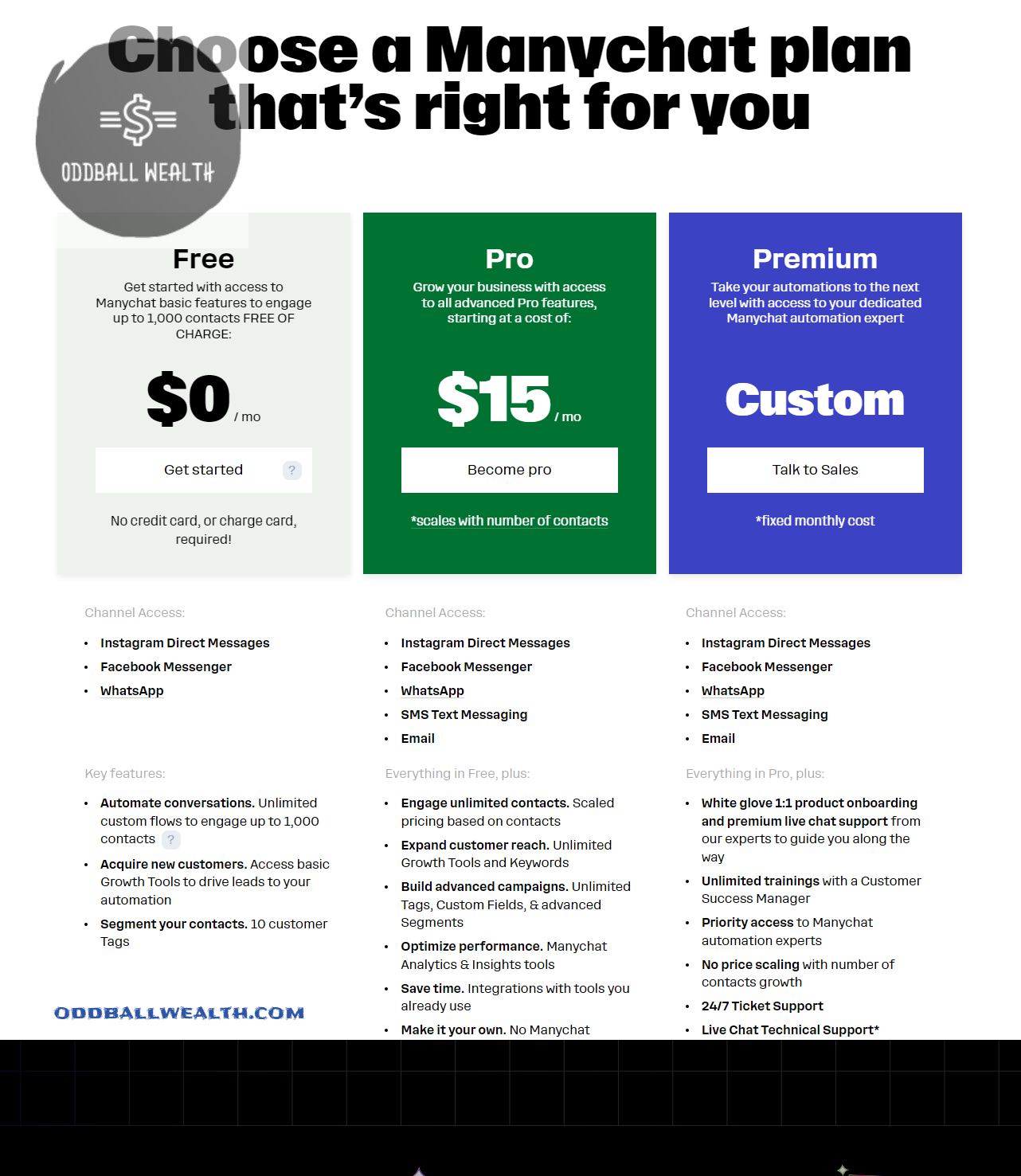
ManyChat’s Free Plan
- Unlimited custom flows to engage up to 1,000 contacts
- Access to basic Growth Tools to drive leads to your automation
- Limited features, including automated conversations, tags, custom fields, and segments
ManyChat’s Pro Plan
- Unlimited custom flows to engage up to 1,000 contacts
- Access to advanced Growth Tools, including unlimited tags, custom fields, and segments
- White-glove 1:1 product onboarding and premium live chat support
- Brand new AI features, including intent recognition, AI-driven questions and responses, and copy improvement
Inbox Pro Pricing
- Priced per Paid user
- Up to 3 Paid users included for free
- +$39 per extra Paid user
- Each teammate who needs access to Inbox Pro features must have a Paid user seat
Billing and Invoicing
- ManyChat Pro plans can only be billed monthly
- The monthly Pro subscription cost is dependent on the number of contacts you have for your account
- The content in your Flows will continue to remain intact, but all Pro features will stop working once your cancel Pro
- Pro features can be re-activated by reviewing your Pro subscription
Canceling Pro Subscription
- You won’t lose any data or contacts if you cancel your Pro subscription
- The content in your Flows will continue to remain intact, but all Pro features will stop working once you cancel Pro
- Pro features can be re-activated by reviewing your Pro subscription
Note that the pricing model may be subject to change, and it’s always best to check the official ManyChat website for the most up-to-date pricing information.
What are the key differences between ManyChat’s free plan and the Pro plan?
Here are the key differences between ManyChat’s free plan and the Pro plan:
- Unlimited Contacts: The Pro plan allows you to engage with unlimited contacts, whereas the free plan has limitations.
- SMS and Email Channels: The Pro plan gives you access to SMS and Email channels, whereas the free plan does not.
- Advanced Automation: The Pro plan includes advanced automation features, such as AI-driven questions and responses, and scripted sets of AI-driven questions and responses for common cases.
- Unlimited Training: The Pro plan includes unlimited training with a Customer Success Manager, whereas the free plan does not.
- Brand new AI features: The Pro plan includes brand new AI features, such as Manychat AI, which offers relevant and accurate responses to messages.
- Segmentation and Growth Tools: The Pro plan includes unlimited growth tools and keywords, whereas the free plan has limitations.
- Pricing: The Pro plan is billed monthly according to the size of your contact list, whereas the free plan is free but has limitations.
- Email Sends: The Pro plan includes monthly email sends up to your contacts limit × 10, whereas the free plan does not.
- Additional Emails: After reaching your email limit, additional emails are billed at $0.003 per email ($3.00 per 1,000) in the Pro plan, whereas the free plan does not.
- SMS Messages: The Pro plan includes 50 free SMS messages per month, whereas the free plan does not.
- Customer Support: The Pro plan includes comprehensive, unlimited assistance in creating powerful automations, whereas the free plan may have limitations.
Detailed Look at Manychat’s Pros and Cons
ManyChat Automation Chatbot Pros and Advantages
ManyChat’s Effortless Flow Builder
Manychat’s drag-and-drop interface allows you to visually design your chatbot’s conversation flow. Imagine building a flowchart – you add elements like text messages, buttons with predefined responses, and media cards (images/videos) to create an engaging and interactive conversation. This eliminates the need for coding knowledge, making it accessible to anyone.
Example: You can design a flow where a user entering your chatbot sees a welcome message with a button offering two options – “Learn about our products” or “Get support.” Clicking “Learn about our products” triggers a series of messages with product information and images, while “Get support” leads to a troubleshooting guide or connects the user to a live chat agent.
ManyChat Lets You Choose Unlimited Custom Fields & Tags
ManyChat chatbot can personalize your interactions by capturing user information during the chat. Create custom fields like “name,” “email,” or “preferred product category.” You can then add tags based on user choices or actions within the chatbot.
Example: When a user interacts with your fashion brand’s chatbot, you can capture their preferred clothing size as a custom field. Based on their selections within the flow, you can add tags like “interested in dresses” or “prefers athletic wear.” This allows you to send targeted broadcasts or sequences with relevant promotions in the future.
ManyChat Makes Integration Between Platforms Easy
Manychat integrates seamlessly with major messaging platforms like Facebook Messenger, Instagram Direct Messaging, WhatsApp, SMS, and Telegram. This means you can manage all your chatbot interactions from a single platform, streamlining your communication efforts.
Example: Imagine a travel agency with a Manychat chatbot. A user can initiate a conversation on Facebook Messenger to inquire about a specific destination. The chatbot can then seamlessly switch the conversation to WhatsApp for sending itinerary details or flight confirmations.
ManyChat Provides Many Growth Tools for Automation & Your Sales Funnel
Manychat offers tools specifically designed to convert leads into customers. You can create lead capture forms within the chatbot flow to collect user information for your email marketing list. Additionally, Manychat allows you to design automated sequences – a series of targeted messages sent based on user actions or time intervals.
Example: A user shows interest in a specific product by clicking on a link within the ManyChat chatbot. Manychat can trigger an automated sequence that sends them follow-up messages with detailed product information, customer reviews, and a special discount code to incentivize purchase.
ManyChat Broadcast, Sequence, and Rule Management
Craft targeted messaging campaigns with broadcasts (sending messages to a large audience segment). Deliver personalized sequences based on user behavior (website visits, product interactions) for a more engaging experience. Set up automated rules to trigger specific actions within the chatbot flow based on user input (keywords used, buttons clicked).
Example: You can send a broadcast message to all your ManyChat chatbot subscribers announcing a new product launch with a special introductory offer. A sequence can be set up for users who abandon their shopping cart online. The sequence might send them a reminder message with the abandoned items and a discount code to encourage them to complete the purchase. Finally, you can create a rule that automatically connects a user to a live chat agent if they type in specific keywords like “urgent” or “need help.”
ManyChat Cons and Disadvantages
ManyChat’s Multi-Language Chatbot Support Can Be Challenging
While Manychat allows you to create chatbots, translating them for multiple languages isn’t as straightforward. You might need to use external tools or workarounds to cater to a global audience.
Example: Imagine you have a clothing store with a large customer base in Spain. Manychat doesn’t offer a built-in translation feature for your chatbot flow. You might need to use a third-party translation service to create the Spanish version of your chatbot content, or consider integrating a language detection tool that automatically switches the chatbot flow based on the user’s location or preferred language.
Who Should Consider Manychat?
Manychat’s user-friendly features and accessible pricing make it a great option for a variety of users, particularly:
ManyChat for Small Businesses
- Streamline customer service with automated FAQs and troubleshooting guides.
- Nurture leads and convert them into customers with targeted messaging campaigns.
- Increase brand awareness and engagement with interactive chat experiences.
- Personalize communication and offers based on customer preferences.
- Manage interactions across multiple messaging platforms (Facebook Messenger, Instagram DM, WhatsApp) from a single dashboard.
ManyChat for Marketers
- Create engaging lead magnets and capture user information within the chatbot flow.
- Design targeted broadcast campaigns to specific audience segments.
- Automate lead nurturing sequences for personalized communication.
- Track chatbot performance and user behavior for valuable marketing insights.
- Integrate Manychat with existing marketing tools for a unified strategy.
ManyChat for E-commerce Businesses
- Offer 24/7 product information and support through the chatbot.
- Upsell and cross-sell related products based on user preferences.
- Automate abandoned cart recovery sequences to win back potential customers.
- Drive traffic to your online store with special offers and promotions within the chatbot.
ManyChat for Entrepreneurs and Solopreneurs
- Create a professional and engaging chatbot presence without needing coding skills.
- Automate repetitive tasks and save time on customer interactions.
- Deliver personalized communication to build stronger customer relationships.
- Manychat’s free plan allows you to experiment with the platform before committing to a paid plan.
Overall, Manychat is a powerful tool for anyone looking to improve customer communication, automate marketing tasks, and increase sales through engaging chatbots.
What are the most common use cases for ManyChat automation features?
ManyChat automation features are used in various industries and scenarios. Here are some of the most common use cases for ManyChat:
- Customer Support: ManyChat is used to automate customer support by providing instant responses to common questions, reducing the workload of human customer support agents.
- Marketing Automation: ManyChat is used to automate marketing campaigns, such as sending promotional messages, offering discounts, and sending updates to subscribers.
- Lead Qualification: ManyChat is used to qualify leads by asking specific questions and directing them to relevant content or offers.
- Product Recommendations: ManyChat is used to recommend products to customers based on their interests, purchase history, and behavior.
- Order Tracking: ManyChat is used to send order tracking updates, shipping notifications, and delivery confirmations to customers.
- Abandoned Cart Recovery: ManyChat is used to send reminders to customers who have abandoned their carts, encouraging them to complete their purchase.
- Welcome Messages: ManyChat is used to send welcome messages to new subscribers, introducing them to the brand and offering exclusive deals.
- Broadcasting: ManyChat is used to send broadcasts to large groups of subscribers, sharing news, updates, and promotions.
- Chatbots for E-commerce: ManyChat is used to create chatbots for e-commerce websites, providing customers with a seamless shopping experience and reducing the need for human customer support.
- Education and Qualification: ManyChat is used to educate subscribers about products or services, and qualify them for specific offers or promotions.
- Automation of Facebook Messenger: ManyChat is used to automate Facebook Messenger conversations, providing customers with instant responses and reducing the workload of human customer support agents.
How do ManyChat automation features handle customer feedback and complaints?
ManyChat automation features provide a seamless way to handle customer feedback and complaints, ensuring timely and personalized responses to maintain a positive customer experience.
Here’s how:
Feedback Bot
ManyChat allows you to create a feedback bot that can be triggered by specific keywords or phrases. This bot can ask customers for feedback and collect responses, enabling you to identify areas for improvement and make data-driven decisions.
Automated Surveys
ManyChat enables you to send automated surveys to customers, allowing you to collect feedback and opinions on specific products, services, or experiences. This helps you to identify trends, patterns, and areas for improvement.
Drip Campaigns
ManyChat’s automation capabilities enable you to create drip campaigns that deliver a series of automated messages over time. These campaigns can be used to follow up with customers who have left feedback or complaints, ensuring that their concerns are addressed and their issues are resolved.
Live Chat Integration
ManyChat integrates with live chat platforms, enabling you to respond to customer feedback and complaints in real-time. This ensures that customers receive timely and personalized responses to their concerns.
Email and SMS Notifications
ManyChat allows you to set up email and SMS notifications for customer feedback and complaints. This ensures that your team is alerted immediately, enabling prompt responses and resolution of issues.
Customizable Workflows
ManyChat’s automation features enable you to create customizable workflows that cater to your specific business needs. This allows you to create tailored responses to customer feedback and complaints, ensuring that each customer receives a personalized experience.
By leveraging ManyChat’s automation features, you can efficiently handle customer feedback and complaints, ensuring that your customers receive timely and personalized responses to their concerns. This helps to maintain a positive customer experience, build trust, and drive loyalty.
What integration options does ManyChat offer for live chat platforms?
ManyChat offers several integration options for live chat platforms, enabling you to connect with your customers in real-time.
Here are some of the integration options ManyChat offers:
LiveChat Trigger
Set up the LiveChat trigger, and make magic happen automatically in ManyChat. Zapier’s automation tools make it easy to connect LiveChat and ManyChat.
Zapier Integration
ManyChat integrates with Zapier, which offers a wide range of integrations with live chat platforms, including LiveChat, Chatfuel, and more.
Integromat Integration
ManyChat also integrates with Integromat, a powerful automation tool that connects with various live chat platforms.
Shopify Integration
ManyChat integrates with Shopify, a popular e-commerce platform, allowing you to connect with customers and provide them with a seamless shopping experience.
PayPal Integration
ManyChat offers PayPal integration, enabling you to accept payments and provide customers with a secure and reliable payment experience.
Google Sheets Integration
ManyChat integrates with Google Sheets, allowing you to track customer interactions and feedback, and analyze data to improve your marketing strategies.
These integration options enable you to connect with your customers in real-time, provide them with personalized support, and improve their overall experience.
Can I set up multiple integration options for live chat platforms in ManyChat?
ManyChat offers various integration options for live chat platforms, allowing you to connect with your customers in real-time and provide them with personalized support.
Some of the ManyChat integration options include the following below:
- LiveChat Trigger: Set up the LiveChat trigger, and make magic happen automatically in ManyChat. Zapier’s automation tools make it easy to connect LiveChat and ManyChat.
- Zapier Integration: ManyChat integrates with Zapier, which offers a wide range of integrations with live chat platforms, including LiveChat, Chatfuel, and more.
- Integromat Integration: ManyChat also integrates with Integromat, a powerful automation tool that connects with various live chat platforms.
- Shopify Integration: ManyChat integrates with Shopify, a popular e-commerce platform, allowing you to connect with customers and provide them with a seamless shopping experience.
- PayPal Integration: ManyChat offers PayPal integration, enabling you to accept payments and provide customers with a secure and reliable payment experience.
- Google Sheets Integration: ManyChat integrates with Google Sheets, allowing you to track customer interactions and feedback, and analyze data to improve your marketing strategies.
These integration options enable you to connect with your customers in real-time, provide them with personalized support, and improve their overall experience.
Can I integrate multiple live chat platforms with ManyChat, such as LiveChat and Chatfuel?
ManyChat offers many integration options for live chat platforms, allowing you to connect with your customers in real-time and provide them with personalized support.
Based on my research, here are some of the key things I found:
LiveChat Trigger
Set up the LiveChat trigger, and make magic happen automatically in ManyChat. Zapier’s automation tools make it easy to connect LiveChat and ManyChat.
Chatfuel Integration
ManyChat integrates with Chatfuel, a popular chatbot platform, allowing you to connect with customers and provide them with a seamless experience.
Zapier Integration
ManyChat integrates with Zapier, which offers a wide range of integrations with live chat platforms, including LiveChat, Chatfuel, and more.
Integromat Integration
ManyChat also integrates with Integromat, a powerful automation tool that connects with various live chat platforms.
While ManyChat offers integrations with multiple live chat platforms, it’s essential to note that each integration may have its own set of features and limitations. For example, LiveChat offers a more advanced live chat feature, while Chatfuel provides a more user-friendly interface for building chatbots.
In conclusion, yes, you can integrate multiple live chat platforms with ManyChat, such as LiveChat and Chatfuel. However, it’s crucial to evaluate the features and limitations of each integration to determine which one best suits your business needs.
Manychat Alternatives: A Head-to-Head Look
Manychat is a popular choice for chatbot creation, but it’s not the only player in the game. Here’s a breakdown of some strong alternatives and how they compare to Manychat:
1. Drift
- Focus: Enterprise-level solution with advanced features like lead qualification and conversational AI powered by machine learning.
- Comparison: More complex and expensive than Manychat, better suited for larger companies with higher budgets.
- Similarities: Both offer user-friendly interfaces and visual flow builders for chatbot creation.
- Differences: Drift has stronger live chat functionalities and advanced analytics, while Manychat offers a free plan and wider integration options for social media platforms.
2. HubSpot Marketing Hub
- Focus: All-in-one marketing platform with built-in chatbot functionality, ideal for comprehensive marketing campaigns.
- Comparison: More comprehensive but also more expensive than Manychat.
- Similarities: Both offer marketing automation tools alongside chatbot creation.
- Differences: HubSpot integrates seamlessly with other HubSpot products, while Manychat has a wider range of integrations with third-party tools.
3. ActiveCampaign
- Focus: Marketing automation platform with a robust chatbot builder, strong for email marketing and lead nurturing.
- Comparison: Similar pricing to Manychat, but with a stronger focus on email marketing tools.
- Similarities: Both provide lead capture forms, email marketing automation, and chatbot creation functionalities.
- Differences: ActiveCampaign excels in email marketing automation, while Manychat offers a free plan and broader social media integrations.
4. Chatfuel
- Focus: Beginner-friendly platform with a simple interface for basic chatbot creation.
- Comparison: Less feature-rich than Manychat and might not be suitable for complex chatbots.
- Similarities: Both offer free plans and visual flow builders for chatbot creation.
- Differences: Chatfuel is easier to learn and use, while Manychat provides more advanced features and integrations.
How to Choose the Best ManyChat Alternative
The best alternative to Manychat depends on your specific needs and budget. Consider the following factors:
- Complexity of your chatbot: Do you need a basic chatbot or a more sophisticated one with AI capabilities?
- Team size and technical expertise: Do you have a dedicated marketing team or are you a solopreneur?
- Budget: Are you looking for a free plan or a paid solution with advanced features?
- Integration needs: Do you need to integrate your chatbot with other marketing tools?
By considering these factors and comparing features, you can find the chatbot platform that best suits your requirements.
Getting Started with Manychat: A Step-by-Step Guide
Ready to create your first chatbot with Manychat? This guide will walk you through the initial setup process:
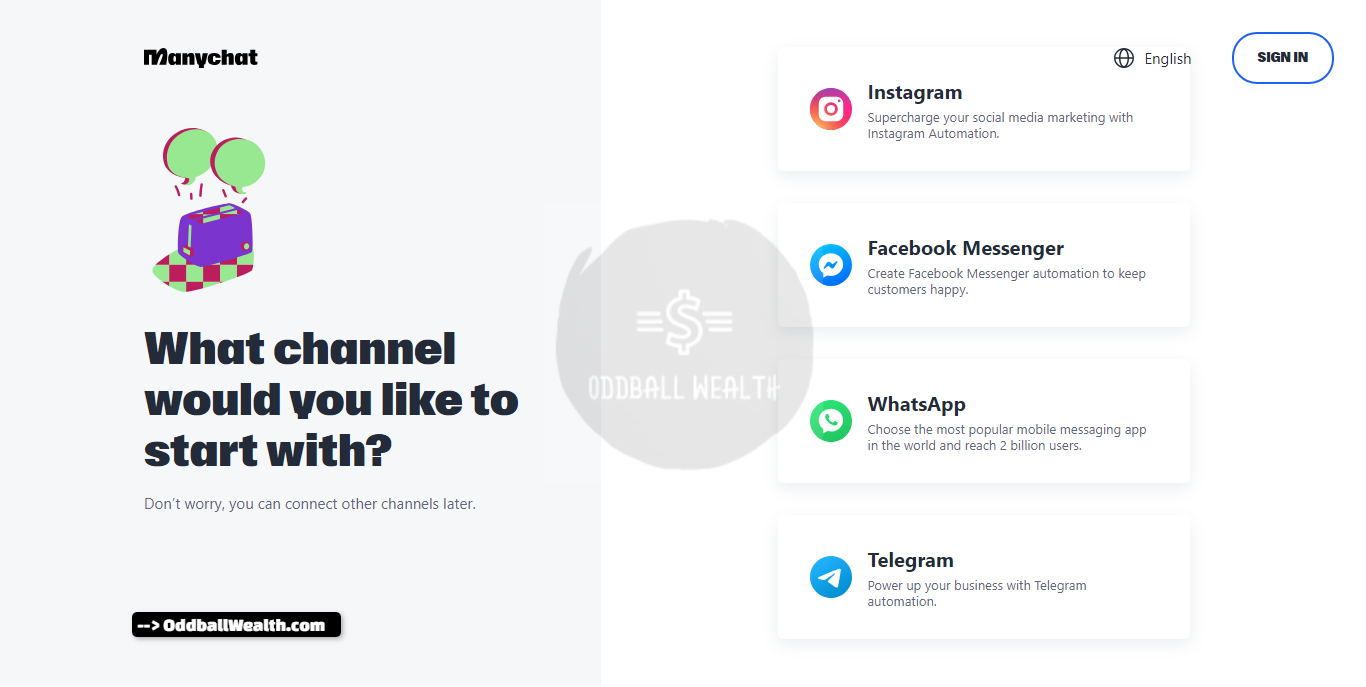
1. Sign Up and Connect Your Facebook Page
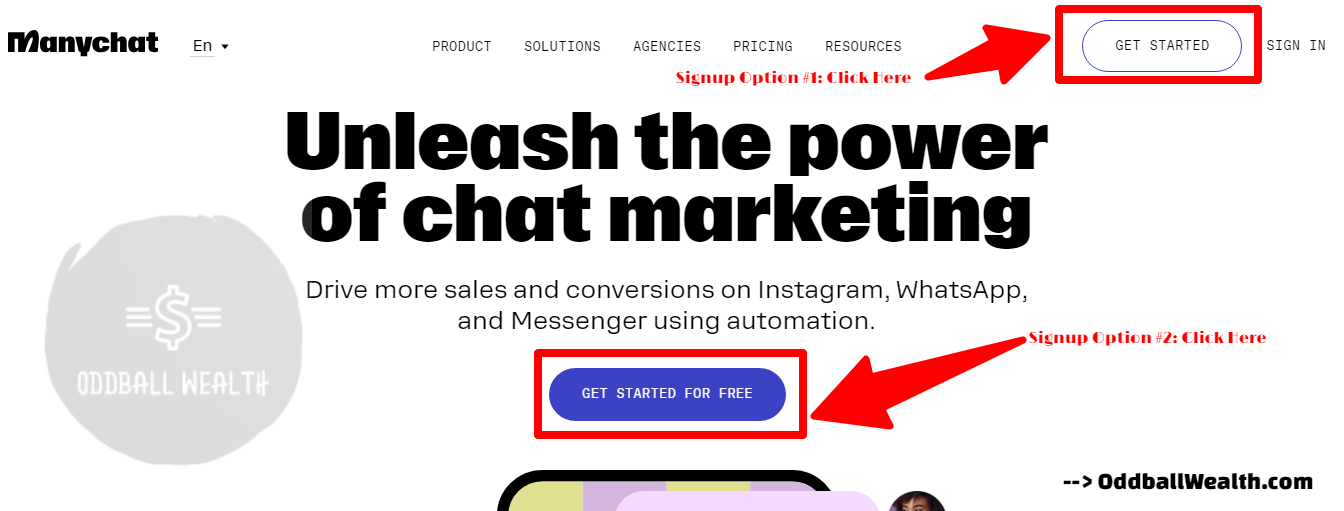
- Head over to https://manychat.com/ and click “Get Started for Free.”
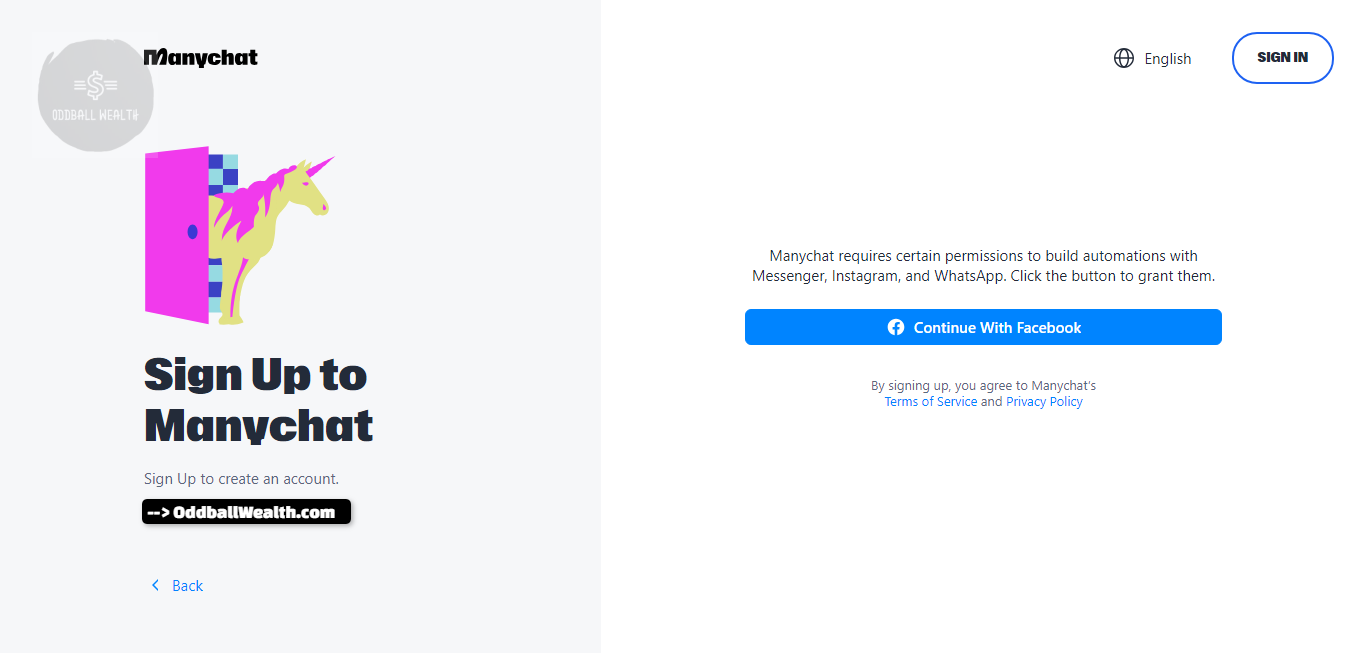
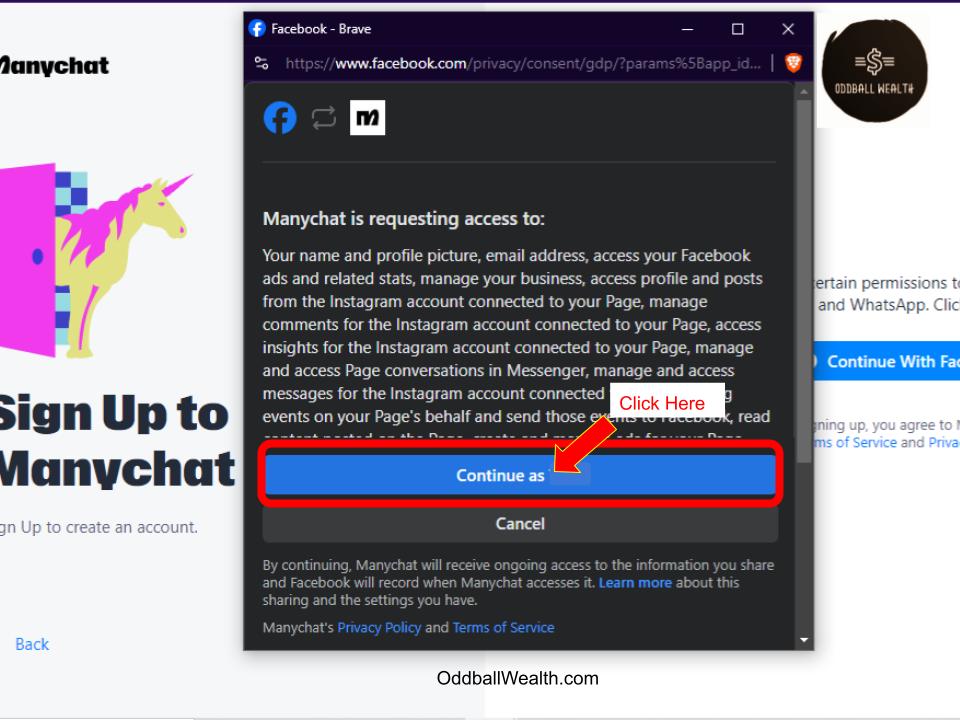
- Log in with your Facebook account. Manychat will request access permissions – click “OK” to grant them (these permissions allow the bot to interact with users on your behalf).
- On the next screen, choose the Facebook Page you want to connect your chatbot to and click “Connect.”
2. Create a Welcome Message with ManyChat
- Manychat will guide you through creating your first “Welcome Message.” This is the initial message users will see when they interact with your chatbot.
- Keep it short, friendly, and informative. Briefly introduce yourself or your business and explain the purpose of your chatbot.
- You can also add a button with a call to action, such as “Learn More” or “Get Started.”
3. Build Your Main Menu
- The ManyChat main menu provides users with navigation options within your chatbot.
- Click on “Growth Tools” and explore the various options like “Lead Capture” or “Subscribe to Messenger.” Choose the tool that aligns with your goals and create a relevant signup flow.
- Once you’ve set up a Growth Tool, navigate back to the “Flows” section and click on “Create a Flow.” Here, you can design the conversation flow for your chosen Growth Tool (e.g., what happens after a user clicks the “Subscribe to Messenger” button).
4. Explore the Flow Builder
- Manychat’s Flow Builder uses a drag-and-drop interface. You can add elements like text messages, buttons, images, and videos to create an interactive conversation.
- Click and drag elements from the left-hand panel onto the canvas to build your flow.
- For buttons, you can specify predefined responses users can click on, allowing them to navigate through the conversation.
5. Test and Launch Your Chatbot
- Once you’ve built your flow, click the “Test” button to simulate a conversation with your chatbot. This allows you to refine your message phrasing and ensure a smooth user experience.
- When you’re satisfied with your chatbot, click “Launch Flow” to make it live on your Facebook page.
ManyChat Tips
- Manychat offers a wealth of resources, including tutorials and templates, to help you get started.
- Explore the “Sequences” section to create automated message series based on user behavior (e.g., a welcome sequence for new subscribers).
- Consider the free plan to experiment with Manychat’s features before committing to a paid plan.
By following these steps, you’ll be well on your way to building your first chatbot with Manychat! Remember, this is just a basic guide – Manychat offers a wide range of features, so keep exploring and experimenting to unleash the full potential of your chatbot.
ManyChat User Ratings and Reviews
ManyChat is a popular chatbot platform that enables businesses to automate their customer interactions and enhance their overall customer experience.
Here’s a summary of the reviews and ratings from various sources:
What ManyChat Users Said They Liked Most About the Platform
- Easy collection of customer information: ManyChat allows businesses to easily collect email and phone numbers, making it a valuable feature for building contact lists.
- User-friendly interface: ManyChat has a super user-friendly interface and visual flow builder, making it easy for users to create chatbots without any coding.
- Affordable pricing: ManyChat offers both free and paid plans, starting at $15/month, making it a popular choice for those new to chatbots or working with a tight budget.
What ManyChat Users Said They Disliked Most About the Platform
- Lack of support: Some reviewers have mentioned their dissatisfaction with the support provided by ManyChat, stating that it is almost non-existent.
- Insufficient training and documentation: Users have expressed their disappointment with the free training materials provided by ManyChat, finding them overwhelming and lacking in step-by-step guidance on using the software’s features effectively.
- Poorly designed desktop version: Some reviewers have mentioned that the desktop version of ManyChat is poorly designed, making it difficult to use.
ManyChat User Ratings
- ManyChat has a rating of 4.5 out of 5 stars on its official website.
- On GetApp, ManyChat has a rating of 4.5 out of 5 stars based on 35 reviews.
- On Trustpilot, ManyChat has a rating of 1.8 out of 5 stars based on 35 reviews.
Real Reviews from ManyChat Platform Users
- “I strongly advise against using ManyChat. Their business model pushes you to constantly buy more room for contacts and add-ons. The desktop version is poorly designed, and you can’t block unwanted contacts, leaving you vulnerable to unwanted interactions.” – ManyChat Review
- “Manychat has allowed me to generate subscribers for my web page in a very simple way. This software has a totally free trial demo… Do not ask for bank data for your test and in simple click you can get to have a robot that generates free subscribers. Totally cool.” – ManyChat Review
- “As opposed to Chatfuel which was so easy to use, I found Manychat extremely complicated to create bots with. Maybe it was like this for me since I was used to Chatfuel, but I just couldn’t figure out Manychat’s ‘Flows’ options, despite reading their online material.” – ManyChat Review
ManyChat Reviews Sources
- https://www.trustradius.com/products/manychat/reviews?qs=pros-and-cons
- https://www.quora.com/What-is-ManyChat-What-are-its-features-How-does-it-differ-from-ChatBot
- https://chatimize.com/reviews/manychat/
- https://www.trustpilot.com/review/manychat.com
- https://www.g2.com/products/manychat/reviews
- https://www.getapp.com/customer-service-support-software/a/manychat/reviews/

Cute Monthly Expenses Spreadsheet: How To Budgeting with Joy
Find out how to quickly transform your finances with a cute monthly expenses spreadsheet! Learn…
Copilot vs Personal Capital Review: Ultimate Guide to Personal Finance Apps
In this article, we compare Copilot vs Personal Capital (known today as the Empower Personal…

Ultimate Guide to Making a Calendar Based Budget
Learn effective money management strategies and how to manage your personal finances stress-free with our…

How to Calculate the Income Needed Based on the Following Budgeted Expenses?

The Ultimate Guide to the Business Budget Sheet: Your Blueprint for Financial Success

Master Your Money: The Ultimate Guide to Budgeting Strategies for Students!

BEST Budget Rules of Thumb Guide: Master Your Money in 2025

How to Make a Budget Percentage Chart: Your Ultimate Personal Finance Guide

17 Best Budget Management Software & Financial Planning Apps!

Disclaimer:
This page may contain affiliate links, meaning we may earn a small commission if you make a purchase through these links, at no extra cost to you. This helps support this channel.